Jira work items and impact
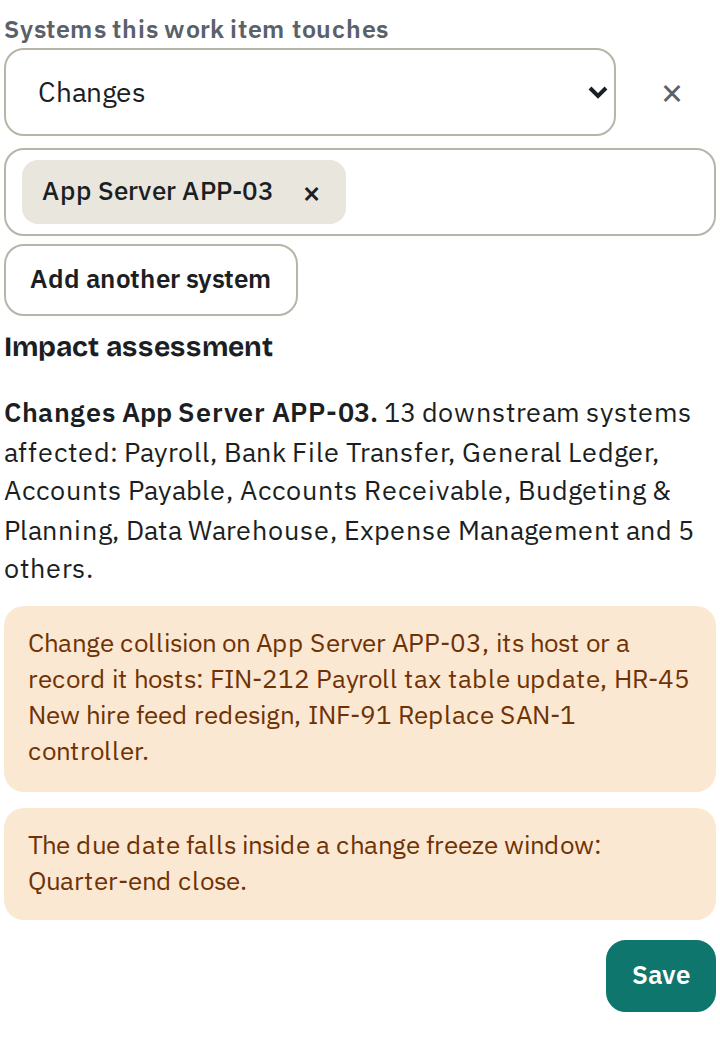
Open the EA Sphere panel on any Jira work item and add the systems it touches, choosing how it touches each one:
| Relationship | Meaning |
|---|---|
| Changes | The work item modifies the system. Counts toward change collisions and change freeze warnings. |
| Delivers | The work item puts a planned system into service. Counts toward change freeze warnings. When a work item that delivers the whole system, rather than one of its modules, is saved while the system has no in-service date, the system is marked as awaiting delivery and shown as Planned. It stays Planned until the work item is done, the last open work item that delivers the whole system is removed or loses that reference, or an in-service date is entered or changed; a future in-service date keeps it Planned until that day. The mark is cleared when that last reference goes, whatever the in-service date, and clearing the in-service date while an open Delivers work item remains marks the system awaiting delivery again (Active to Planned); every open work item counts, including ones the person removing the reference cannot see in Jira, and the record's change history notes the change of stage. A Delivers reference to a module does not change the system's stage or in-service date, even when the work item is done, and its impact assessment says so. When the work item is done, the system's stage becomes Active and its in-service date is set to that day, in the time zone set under Settings, General (or the person's own day when an EA Sphere page records the Done before Jira's event arrives), unless an earlier date is recorded. |
| Depends on | The work item needs the system to be available. Planned degradations and retirements before the due date are flagged. |
| Retires | The work item retires the system. Counts toward change collisions and change freeze warnings, as Changes does. While the work item is open, the system stays Retiring, and its change history says so, even after the planned retirement date has passed. A Retires work item deleted in Jira before it was done also keeps the system Retiring until it is removed from EA Sphere; one reopened in Jira after its Done was applied no longer holds the system, which stays Retired. Adding or removing a Retires reference on a system past its planned retirement date records the change of stage, Retired or Retiring, in its history. A Retires reference to a module does not change the system's retirement date or stage. How Retires work items set the planned retirement date is described below the table. |
| Mitigates | The work item follows up a degradation or an exercise. |
The impact assessment shows the downstream systems affected, other open work changing the same system, its host or a record it hosts, and conflicts with change freeze windows as systems are added, before the references are saved. A work item's summary, status and due date always come from Jira, read with the permissions of the person adding it, and are kept current as it changes. EA Sphere applies a work item's effects on records (the planned retirement date set by Retires and the awaiting-delivery mark set by Delivers) and its lines in the records' change history on the server, with the save of the work item itself, whether a person saves it or a Jira event updates it.
These effects are never lost: EA Sphere keeps any still to apply until they are applied. When a large save's effects do not fit in one request, the page asks EA Sphere to finish them straight away, up to five times, and again at each refresh while any are left; the EA Sphere panel on a Jira work item, which does not refresh, asks again by itself, less often each time. Until they are applied, the page shows Saving… and warns before it is closed. Any still left, for example because the page was closed, are applied when Jira next sends an update event for those work items, or by the weekly maintenance, which checks every record's planned retirement date and awaiting-delivery mark against its work items. Jira's events and the weekly maintenance first apply any Done not yet applied; until then, a work item marked Done still holds the record's planned retirement date. The weekly maintenance also checks work items already marked as applied and puts back a Done that a save carried back, without adding a history line and without overriding a planned retirement date someone set after the Done. While it is in view, an open page checks for changes every 30 seconds, so changes the weekly maintenance makes appear at the next check.
A Jira work item can be referenced once; to change how it touches systems, edit the existing work item. A work item kept only in EA Sphere never takes a Jira work item's place, and a work item EA Sphere stores is never linked to a different Jira work item. If two people add the same Jira work item at the same time, both people's references are kept, and the records' change history shows one set of lines. A new work item whose referenced records have all just been deleted by someone else is not added, and EA Sphere says so once, naming the deleted records and the work item; in the EA Sphere panel on a Jira work item, those records also leave the panel.
The panel saves only the changes you make in it, so references someone else added meanwhile stay. Only the references the panel's rows were drawn from are yours to change or remove there: a reference to a record the panel has not loaded, such as one created after the panel was opened, is left as it is, whatever you do with the rows. While it saves or reads, the panel is held: its controls do nothing until EA Sphere answers. When it reads records it has not loaded, it says “Loading the other records referenced…”, its controls are unavailable, and the note it showed before comes back afterwards; it adds rows only for the records it read, and a row you removed is never added back. Every note about something not saved or not done is shown in amber, for example “That work item was removed from EA Sphere by someone else.” or “Fleet Telematics was deleted by someone else, so OPS-1 was not added.”, and the others in teal. The panel says Saved only when EA Sphere has recorded the save; otherwise it keeps the rows you entered and says “Not saved:” with the reason, or, when the answer was lost, “It is not known yet whether this was saved: EA Sphere could not be reached. Select Save to check and try again.”
The panel saves a work item only with at least one system. Removing the last row of a work item already in EA Sphere reads EA Sphere first: any reference the panel did not show counts as someone else's and keeps the work item, and only your references are removed, for example “Your references were removed. OPS-1 stays in EA Sphere: someone else referenced General Ledger.” When no one else's reference is left once yours are removed, for example because someone removed theirs meanwhile, the panel asks whether to remove the work item. It says “Removed from EA Sphere.” only once EA Sphere has recorded the removal, or “Not removed:” with the reason. A removal whose answer was lost is checked against what is stored; when that cannot be read, the panel says “It is not known yet whether OPS-1 was removed: EA Sphere could not be reached. Select Save to check and try again.”
Delivers and Retires are applied once, by EA Sphere, when the work item is done: when Jira reports it, or, for a work item kept only in EA Sphere, when its status is set to Done. They are applied to every record the work item references, and the work item's mark that they were applied is saved with the last of the records they change, so it is never set while a record is still to change: if storage refuses part way, the records not yet changed are changed as described above for effects still to apply, and none is changed twice; a reference added after the work item was marked Done is applied by the next save, Jira's update event or the weekly maintenance: the record is retired, or enters service, on the same day, with one Retired by or Delivered by line.
A Jira event takes its turn with people's saves, waiting up to 15 seconds for a change in progress to finish. An event that still cannot begin, or that has too little of its time left to apply a Done, is delivered again by Atlassian 30 seconds later, up to four times. Should all of those find EA Sphere busy, Jira's next event for that work item, the next EA Sphere page to read the work item's status from Jira, or the weekly maintenance applies the Done where it was not applied. A reference removed before the Done is not retired or delivered by it, and its record is worked out again as that person's own change, counting only the work items they can see in Jira.
The date used is the day the work item was marked Done, not the day the effect is applied. Changes that come from Jira, such as a work item done or a new due date, and the corrections the weekly maintenance makes, are shown in the records' change history as made by EA Sphere, even when a page records them from Jira's details. In a save that carries both a due-date change from Jira and your own change to the references, EA Sphere works out Jira's part from the work items as they were before your change: the date change is shown as made by EA Sphere and the reference change as yours, and your own change never moves the date because of a work item you cannot open.
A work item deleted in Jira is shown as deleted and no longer counts as open work; the systems it touches can no longer be changed, but it can be removed from EA Sphere. The Work items page lists every referenced Jira work item with its Jira status, together with work items kept only in EA Sphere, marked Not in Jira: follow-up actions created when no Jira space is set for them under Settings, Jira, and the sample company's work items. Add Jira work item references an existing work item by its key. Adding a Jira work item that is already in EA Sphere updates its references, and EA Sphere says so; it says the work item was added only when it is there because your own earlier try, whose result was not known, was recorded.
Planned retirement dates
A planned retirement date taken from work items is always the earliest due date among the open work items that retire the whole system: it follows their due dates as they change in Jira, including a due date cleared and set again, and it is cleared when none of them has a due date, for example when the last one is deleted in Jira or its Retires reference or the work item is removed from EA Sphere. A retirement date set by hand, in the record form, the dates dialog or a CSV import, is never moved or cleared by work items' due dates; only a work item that retires the system being done changes it. Clearing a date set by hand while open Retires work items with due dates remain sets the date from those work items again.
The date counts every work item that retires the system, including work items some people cannot open in Jira; those people never see such a work item's key, summary, Jira status or due date in EA Sphere's work item views, although the system's planned retirement date may be that due date. A person's own save never changes the date because of a work item they cannot open; changes that come from Jira, and the weekly maintenance, count every work item and are shown in the change history as made by EA Sphere. When the work item is done, the retirement date is set to that day, in the time zone set under Settings, General (or the person's own day when an EA Sphere page records the Done before Jira's event arrives). A Retires reference added to a work item that is already done, or a work item added to EA Sphere already done, for a system already retired or past its planned retirement date, keeps the earlier date, and writes a Stage line only if the stage changes.